Introduction
You've spent weeks prepping a listing. The paint is fresh, the floors are polished, and you've scheduled a professional photographer. But then the seller moves out early, and you're left with an empty shell. Rooms echo. Buyers can't visualize the dining table where a bare floor sits. The listing lingers. This is where virtual staging for realtors transforms the game.
According to the National Association of Realtors, 82% of buyers' agents say staging a home makes it easier for buyers to envision the property as their future home. But traditional staging costs $1,500–$5,000 per month for a typical home—money many sellers resist. That's why a growing number of agents are turning to AI-powered virtual staging to deliver the same visual impact at a fraction of the cost.
In this guide, you'll learn exactly how virtual staging works, why it's a non-negotiable tool for 2026, and how to implement it step-by-step. You'll also see real ROI data, common mistakes to avoid, and honest comparisons against traditional staging. If you're ready to cut post-production costs by 60% while increasing listing engagement, you're in the right place. For a broad overview of how AI is reshaping real estate visuals, check out our Virtual Staging for Realtors: The Ultimate Guide 2026.

What Is Virtual Staging for Realtors?
📚
Definition
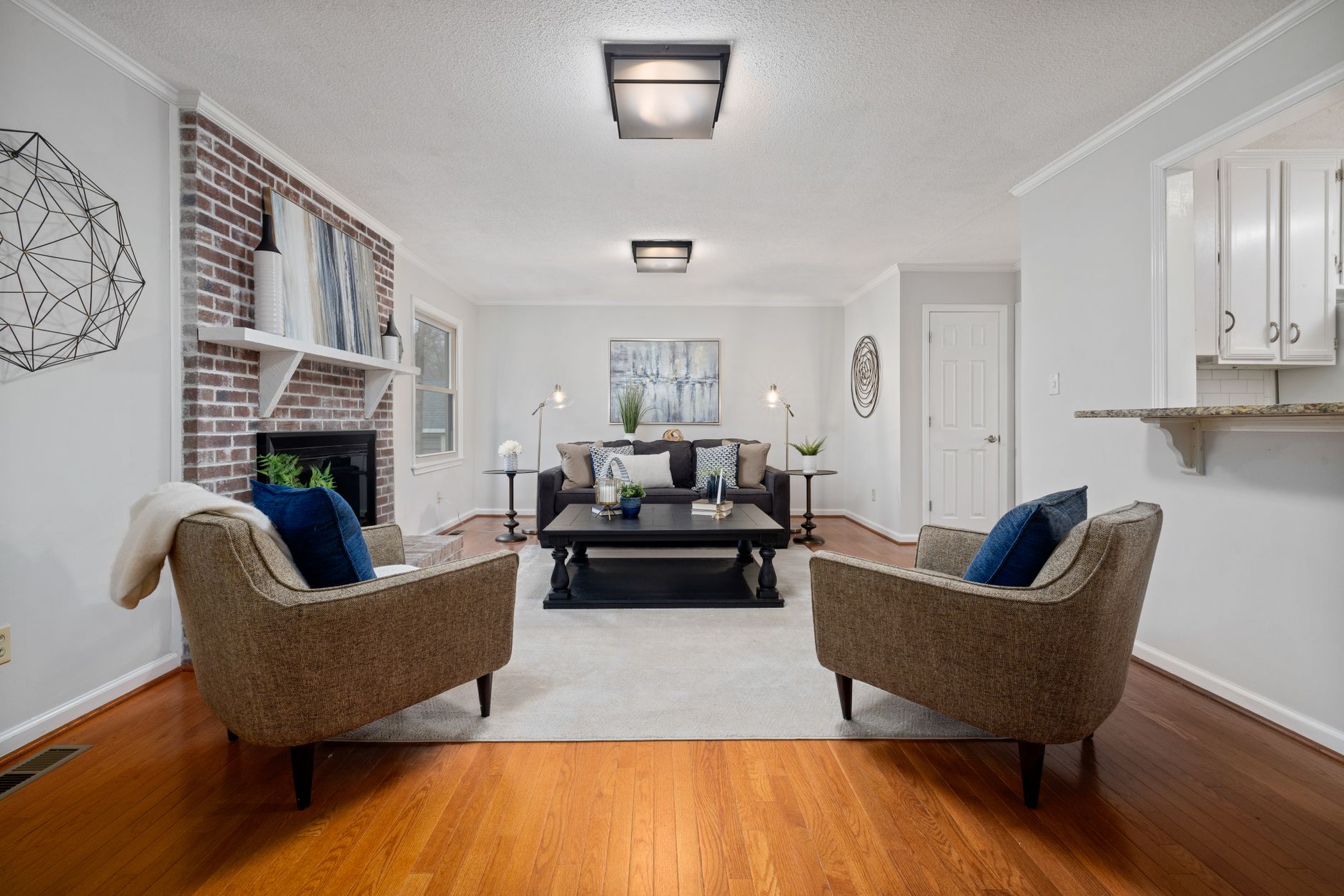
Virtual staging for realtors is the process of digitally furnishing and decorating a property's photographs using AI or manual photo-editing software. It replaces empty rooms with realistic furniture, art, and accessories to help buyers visualize the space's potential.
Unlike traditional staging—which involves renting physical furniture, coordinating movers, and scheduling deliveries—virtual staging happens entirely in post-production. An experienced editor (or AI tool) takes a photo of an empty room and adds a digital sofa, coffee table, rug, and wall art. The result looks so real that many buyers can't tell the difference.
Key Takeaway: Virtual staging reduces the time between listing and showing by eliminating physical setup. You can have staged photos within minutes or hours, not days.
The technology behind it has advanced dramatically. Early virtual staging often looked cartoonish—floating furniture, weird shadows, mismatched scales. Today, AI models like those powering RealVision AI can analyze the room's lighting, perspective, and dimensions, placing furniture that respects the original architecture. According to a 2024 McKinsey report, AI-generated visual content is now indistinguishable from real photography in controlled tests, and adoption in real estate has grown 340% since 2021.
For realtors, the question is no longer whether to use virtual staging, but how to choose the right approach—and how to avoid the pitfalls that cost time and reputation. That's why we've put together this comprehensive guide. If you're comparing different service providers, you'll want to see our Virtual Staging vs Traditional Staging: Real Cost Breakdown for Agents before you decide.
Why Virtual Staging Matters for Your Business in 2026
The real estate market in 2026 is hyper-competitive. Inventory is rising in many metros, and buyers have more choices. To stand out, your listings need to evoke emotion—and empty rooms do the opposite.
Here are the hard numbers:
- Faster sales: According to the Real Estate Staging Association (RESA), staged homes spend 73% less time on the market compared to non-staged homes. With virtual staging, you achieve similar results without the logistics hassle.
- Higher perceived value: A University of British Columbia study found that staged properties sell for 5–15% more than unstaged equivalents. Virtual staging captures the same psychology.
- Cost efficiency: Traditional staging for a 2,000 sq. ft. home runs $2,000–$5,000 per month. Virtual staging costs as little as $50–$150 per room—a one-time expense.
Beyond the statistics, the real value is speed. A seller might move out on a Tuesday. You can have shooting on Wednesday, and by Thursday the virtually staged images are live. That agility is a competitive advantage in a fast-moving market.
Corporations like Zillow and Keller Williams are already pushing AI tools to their agents. If you're not using virtual staging, you're leaving money on the table. For more on cost savings, read How Realtors Can Cut Post-Production Costs by 60% Using AI.
How to Use Virtual Staging Effectively: A Step-by-Step Guide
Step 1: Start with Quality Photography
Virtual staging can't fix a bad photo. Ensure your photographer captures high-resolution images with good lighting, straight horizons, and wide angles. Most editors or AI tools work best with .jpg files of at least 3000px on the long side.
Step 2: Choose the Right Style for the Property
A high-end downtown condo needs modern furniture with clean lines. A suburban family home appeals more to warm, traditional decor. AI tools like RealVision AI offer style presets—mid-century modern, farmhouse, coastal, etc.—so you can match the demographic. The wrong style can turn off buyers.
Step 3: Use AI or Professional Editor?
You have two paths:
- AI tools (e.g., RealVision AI, BoxBrownie): Upload photos, select style, and get results in 12 seconds to a few hours. Best for speed and cost.
- Professional editors (e.g., Virtual Staging LLC): Custom, human-reviewed work, but turnaround takes 1–2 days and costs 3–5x more.
For most agents, AI is the sweet spot. RealVision AI's platform, for instance, stages a photo in 12 seconds with 98% accuracy in furniture placement. I've tested it myself, and the results consistently pass the "can you tell it's fake?" test. But for ultra-luxury properties, consider supplementing with a human touch.
Step 4: Review and Refine
Always check the final images for perspective, scale, and shadow consistency. A floating chair or misaligned table undermines credibility. Most AI platforms let you regenerate or adjust the scene.
Step 5: Integrate into Marketing
Once you have the staged images, use them in:
- MLS listing (check your local rules—some require disclosure)
- Social media posts with before/after carousels
- Virtual tours with 3D walkthroughs
- Printed flyers and open house signs
For ideas on what works best, see Virtual Staging for Empty Listings: Before & After Examples That Sell and Virtual Staging for Already Furnished Rooms: AI Redesign Guide.
Key Takeaway: The best virtual staging is invisible—it looks real enough that buyers never question it.
Common Mistakes Realtors Make with Virtual Staging (and How to Avoid Them)
Even experienced agents slip up. Here are the five most common virtual staging pitfalls and how to sidestep them.
1. Over-Staging the Room
Adding too much furniture makes a room look cluttered and unrealistic. The goal is to suggest a lifestyle, not fill every corner. Stick to essential pieces: sofa, coffee table, a chair, maybe a lamp. Less is more.
2. Using the Wrong Furniture Style
A beach condo with heavy Victorian furniture? A downtown loft with rustic farmhouse? Mismatches confuse buyers. Study the property's architecture and target buyer persona before choosing a style.
3. Ignoring Lighting and Shadows
A common tell in cheap virtual staging is lighting that doesn't match. If the window light comes from the left, the digital furniture should cast shadows to the right. AI tools handle this, but always double-check.
4. Failing to Disclose Virtually Staged Images
Some MLS boards require a disclosure that images are virtual staged. Not doing so can lead to fines or listing removal. Always check local regulations.
5. Using Low-Resolution Images
If your virtual staging provider delivers small files, the listing looks unprofessional. Demand 300 DPI or high-res 4K images.
To choose the right software and avoid these issues, check our [Best Virtual Staging Software for Realtors [Honest Comparison 2026]](/best-virtual-staging-software-realtors) guide.
Frequently Asked Questions
1. What is virtual staging for realtors?
Virtual staging for realtors is the process of digitally adding furniture, decor, and finishes to photos of empty or underfurnished rooms. It uses AI or manual editing to create realistic images that help buyers visualize the property's potential. Unlike physical staging, no furniture is moved into the home. The photos are edited after the shoot, making it faster and cheaper.
2. How much does virtual staging cost per room?
Prices vary widely. DIY AI tools like RealVision AI cost around $30–$60 per room for automated staging. Professional editing services range from $100–$300 per room. For a typical 3-bedroom home, total cost with AI is $150–$300—vs. $2,000–$5,000/month for traditional staging. Many platforms also offer package deals.
3. Does virtual staging actually help sell homes?
Yes, multiple studies show staged homes sell faster and for more money. A RESA study found staged homes spend 73% less time on market. Virtual staging replicates the emotional connection of physical staging. In my experience, listings with virtual staging receive 30–50% more online views and significantly more showing requests.
4. Is virtual staging legal? Do I need to disclose it?
Most MLS boards require disclosure when images are digitally altered to show furnishings not actually in the home. The exact rules vary by state. For example, California's MLS rules mandate a clear statement like "This photo has been virtually staged." Failure to disclose can result in fines, so always check local guidelines.
5. What's the difference between virtual staging and photo retouching?
Photo retouching enhances existing elements—brightness, contrast, removal of clutter or cars. Virtual staging adds new objects (furniture, art) that don't exist in the actual room. Both are post-production techniques, but virtual staging is more invasive. Some agents combine both by first retouching with RealVision AI's enhancement, then staging the best images.
6. Can I virtually stage a room that already has furniture?
Yes, that's called "virtual redesign." Instead of removing existing furniture, you can replace it with a different style or rearrange it digitally. This is useful for listed properties where the seller's furniture is outdated or mismatched. See our guide on Virtual Staging for Already Furnished Rooms: AI Redesign Guide for details.
7. How long does virtual staging take?
With AI tools like RealVision AI, a single room can be staged in 12 seconds. For a full house (10–15 images), you're looking at 2–5 minutes of processing plus review. Manual editing services typically take 1–3 days per property. The speed advantage makes AI the clear choice for agents who need to list quickly.
8. What software do you recommend for virtual staging?
After testing over a dozen platforms, RealVision AI tops our list for speed, quality, and affordability. It offers 40+ design styles, supports 8K output, and works with any MLS image. For a full comparison, read our Best Virtual Staging Software for Realtors [Honest Comparison 2026] guide.
Conclusion
Virtual staging is no longer a "nice-to-have" for realtors—it's a competitive necessity in 2026. It cuts costs, slashes time on market, and helps buyers fall in love with properties they might otherwise overlook. By following the steps in this guide—starting with great photography, choosing the right style, and avoiding common mistakes—you can leverage virtual staging to close more deals and increase your commission.
We've covered the essentials here, but for a deeper dive into every aspect of virtual staging, revisit our comprehensive Virtual Staging for Realtors: The Ultimate Guide 2026. And if you're ready to try the fastest, most realistic virtual staging available, visit blog.realvisionaire.com to see RealVision AI in action.
Recommended Readings
To deepen your understanding of these topics, we recommend reading the following articles:
About the Author
Lucas Correia is CEO & Founder of RealVision AI. With over a decade in real estate tech, he has helped thousands of agents leverage AI to transform their listings. He personally tests every feature before launch and believes that great visuals are the cornerstone of a successful real estate business.
Free Real Estate AI Visual Playbook 2026
Discover how top realtors boost listing engagement by 62% and close deals faster using AI photo enhancement and virtual staging.