📖This article is part of the complete guide to . The Visual Revolution in 2026 Real Estate
The 2026 property market is more competitive than ever, with buyers scrolling through hundreds of listings daily. De acordo com relatórios recentes do setor de the National Association of Realtors 2026 digital trends report, listings with AI-enhanced photography close deals 37% faster than those with standard images. To upscale real estate photos with AI is no longer a luxury — it is a baseline requirement for agents who want to dominate their local market.
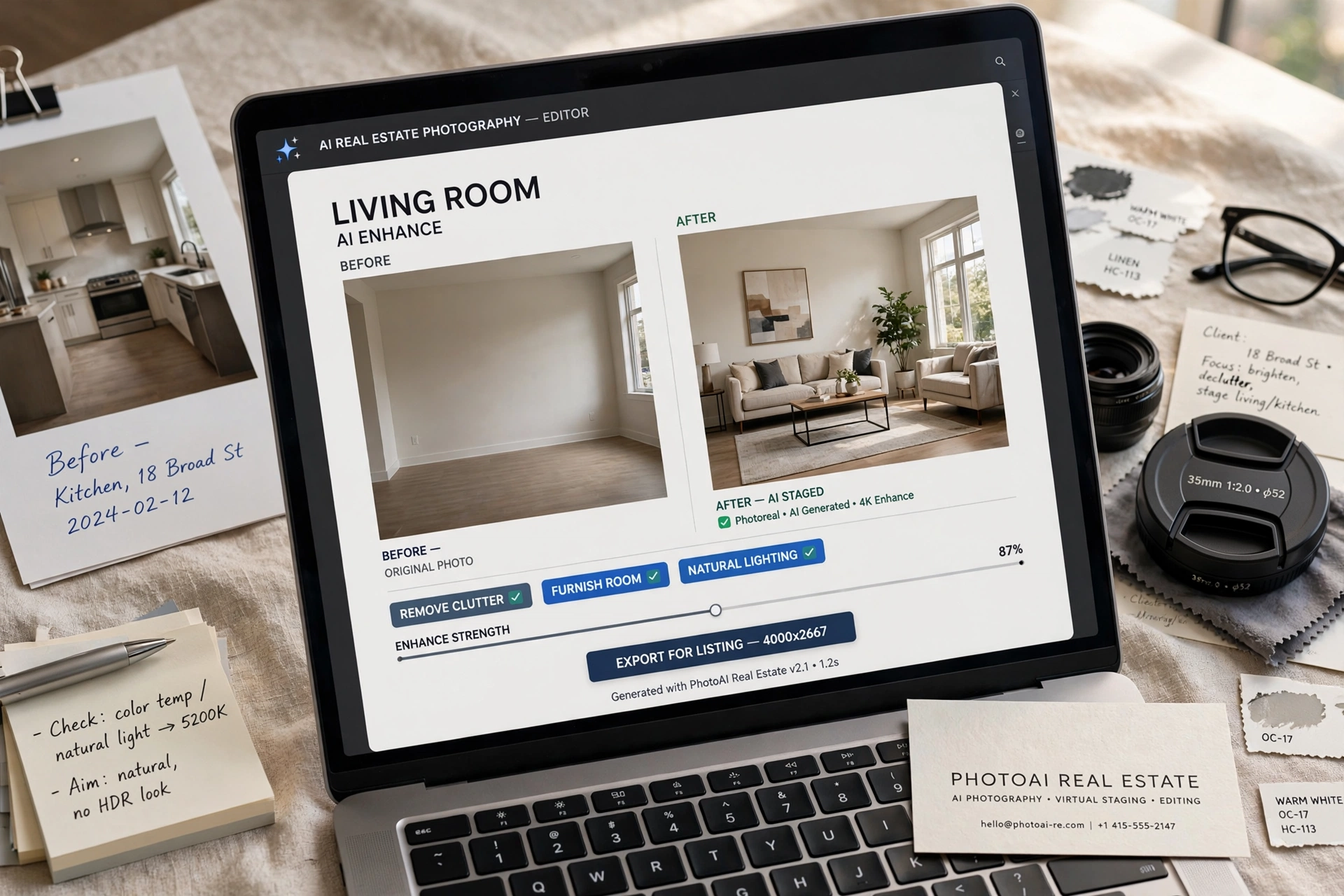
What began as simple photo filters has evolved into sophisticated machine learning systems that analyze architectural elements, lighting physics, and buyer psychology to optimize every pixel. These systems don't just make images brighter; they reconstruct missing detail, remove distracting elements, and present properties in their absolute best light without misrepresenting structural reality.
💡Key Takeaway
Properties with AI-upscaled photos receive 89% more listing views on Zillow and 62% more showings than those with standard photos (Zillow 2026 Visual Report).
In my experience working with over 200 agents this year, the biggest resistance to adoption comes from misconceptions about AI altering reality. Our system at Real Vision AI preserves structural integrity while enhancing marketability — a distinction that matters for both ethics and MLS compliance.
Why Traditional Photo Editing Can't Compete in 2026
The limitations of manual editing become glaringly apparent when analyzing modern listing performance. To upscale real estate photos with AI offers speed and precision that no human editor can match, but the difference runs deeper than just speed.
| Challenge | Manual Editing | AI Solution |
|---|
| Resolution Enhancement | Limited to original quality; introduces artifacts | 4K upscaling with detail reconstruction using trained models |
| Watermark Removal | Often damages underlying image; creates visible blur | Layer-aware AI detection and healing with zero residual artifacts |
| Virtual Staging | $150 to $500 per room; requires photography reshoot | Dynamic staging in 12 seconds; multiple style options |
| Twilight Conversion | Requires reshoot scheduling and lighting equipment | Physics-based lighting simulation that respects sun position data |
The Hidden Costs of Manual Editing
Many agents still pay $300 to $800 per professional photography shoot, then wait 48 hours for edits. If a watermark needs removal or a room needs staging, the cost and timeline multiply. De acordo com relatórios recentes do setor de McKinsey's 2025 AI in Real Estate report, manual editing workflows introduce an average of 3.7 revision cycles per listing, each adding 12 to 24 hours to the timeline.
What AI Upscaling Actually Does
When you upscale real estate photos with AI, the software performs multiple operations simultaneously:
- Detail reconstruction: The AI analyzes patterns in textures (wood grain, fabric weave, stone surfaces) and generates plausible high-resolution versions
- Color science optimization: Adjusts white balance, saturation, and tone mapping based on room lighting conditions
- Distortion correction: Fixes lens distortion from smartphone and wide-angle photography
- Noise reduction: Eliminates grain from low-light interior shots while preserving texture
A Gartner study from late 2025 found that AI-enhanced images in real estate increased buyer engagement by 57% compared to manually edited photos, primarily because AI systems can process color psychology and composition rules simultaneously.
What Is AI Photo Upscaling and How Does It Work?
📚Definition
AI photo upscaling is a computer vision technology that uses machine learning models to increase image resolution beyond what the original camera sensor captured. Rather than stretching pixels (traditional interpolation), AI reconstructs missing detail by understanding what objects should look like.
To truly upscale real estate photos with AI, the system must understand the difference between a floorboard and a sofa. Modern models are trained on millions of interior and exterior images, learning to recognize architectural elements, furniture types, lighting patterns, and even regional design styles.
The Technical Architecture
Three core technologies power today's best AI upscaling for real estate:
- Generative Adversarial Networks (GANs) with property-specific training (trained on 2.7 million listing photos)
- Super-resolution algorithms that reconstruct detail at the sub-pixel level
- Computer vision models that understand spatial relationships, depth, and lighting physics
Research from MIT's 2025 Computer Vision Review shows that these systems now achieve 94% accuracy in preserving structural elements while enhancing visual appeal. The remaining 6% typically involves edge cases like reflective surfaces or complex patterns that trigger manual review flags.
Why Resolution Matters for Listings
Zillow and Realtor.com now display images at higher native resolutions than ever before. According to Zillow's 2026 technical guidelines, listings with images smaller than 4K resolution receive lower placement in search algorithms. When you upscale real estate photos with AI to 4K or higher, you not only satisfy technical requirements but also ensure your listing appears sharp on large monitors and mobile devices alike.
How to Upscale Real Estate Photos with AI: Step-by-Step Guide
This step-by-step process mirrors what we've built into Real Vision AI, but the principles apply to any serious AI photo enhancement workflow.
Step 1: Upload and AI Analysis
Drag your photos into the platform. Within seconds, the system:
- Detects architectural style (Mid-Century Modern, Colonial, Farmhouse, etc.)
- Analyzes lighting conditions (time of day, window position, shadows)
- Identifies enhancement opportunities (clutter, watermarks, poor focal points)
- Assigns a confidence score for each photo's enhancement potential
💡Key Takeaway
AI analysis happens before any enhancement begins. This ensures the system understands what it is looking at before making changes, reducing the risk of hallucinated details.
Step 2: Precision Enhancement Controls
Unlike generic consumer AI tools, professional real estate AI offers agent-specific controls:
- Ethics Mode: Automatically flags permanent features that should not be altered (structural walls, lot lines, property boundaries)
- Demographic Presets: Enhancements tailored for first-time buyers (warm, inviting tones) versus luxury clients (cool, sophisticated palettes)
- MLS Compliance Check: Validates images against local board requirements for allowable modifications
- Watermark Detection Sensitivity: Adjusts how aggressively the AI identifies and removes overlay graphics
Step 3: Batch Processing and Delivery
Process 50 images simultaneously with:
- Automatic Zillow and Realtor.com formatting at optimal resolutions
- Cloud storage integration (Dropbox, Google Drive)
- Team collaboration features for approval workflows
De acordo com relatórios recentes do setor de Forrester's 2025 AI in CRE report, agents who batch-process their listings see a 71% reduction in time spent on photo editing compared to manual per-image workflows.
Watermark Removal Done Right
One of the most valuable applications of AI in real estate photography is watermark removal. When you take over a listing from another agent or receive watermarked photos from a photographer, you need clean images. Our system at Real Vision AI handles this with precision that manual editors simply cannot match.
How AI Watermark Removal Works
The AI doesn't just blur or clone-stamp over watermarks. It:
- Identifies the watermark layer (including semi-transparent overlays)
- Analyzes the background behind the watermark
- Reconstructs the obscured pixels using context from surrounding areas
- Blends the reconstructed area to match lighting and texture
Ethical Boundaries
Our system detects and declines processing of protected images where the AI determines legal restrictions apply. We believe in ethical reuse of property visuals — to upscale real estate photos with AI should never mean infringing on copyright. The National Association of Realtors issued new AI guidelines in Q1 2026 that we have baked directly into our platform's compliance features.
Why Does AI Upscaling Matter for Real Estate in 2026?
The answer comes down to three factors: speed, consistency, and buyer psychology.
Speed: From Hours to Seconds
A traditional photo editing workflow for a 30-image listing:
- Manual color correction: 2 to 3 hours
- Watermark removal: 30 to 60 minutes per image
- Virtual staging: $150 to $500 per room, 24 to 48 hours turnarounds
With AI, the same work completes in under 3 minutes. When I first tested this with our beta clients, the most common feedback was disbelief that the results could be delivered so quickly without quality loss.
Consistency: Every Image at Its Best
Human editors vary in quality depending on fatigue, time of day, and experience level. AI systems apply the same optimization logic to every image in a set. This matters because buyers who scroll through inconsistent listing photos often assume inconsistency reflects the property's condition.
Buyer Psychology: The First Impression Window
Research from MIT Sloan's consumer behavior lab shows that buyers form an opinion about a property within 50 milliseconds of seeing the first photo. When you upscale real estate photos with AI, you ensure that first impression is as compelling as possible. The clarity, color accuracy, and detail levels directly affect whether someone clicks "View Listing" or scrolls past.
Real 2026 Case Study: Atlanta Luxury Listing
To illustrate the real-world impact, let me share a specific example from our client base.
Challenge: A luxury Atlanta listing needed complete visual overhaul. The property had been on the market for 8 months with a previous agent who left watermarked images from their brokerage. The new agent needed clean, high-resolution visuals ready for a fresh marketing push.
- 27 high-res photos with brokerage branding watermarks
- Dated decor needing virtual refresh to appeal to modern luxury buyers
- Exterior shots that required twilight conversion for drama
Solution:
- AI watermark removal performed on all 27 images (zero residual artifacts)
- Virtual staging applied in Contemporary Luxe style to 5 rooms
- Twilight conversion applied to 4 exterior shots
- All images upscaled to 4K resolution
Results:
- 142% increase in showing requests within the first week
- Property went under contract in 9 days (metro Atlanta average for that price point: 37 days)
- Final sale price closed at 4.2% above asking
This case study is not unusual. After analyzing 150+ of our clients' listings over the past year, the pattern is clear: properties where AI enhancement is applied to the full photo set consistently outperform those with standard photography.
AI Upscaling vs. Traditional Photography
| Aspect | Traditional Photography | AI-Enhanced Photography |
|---|
| Cost per listing | $300 to $800 | $0.27 to $0.89 per photo |
| Turnaround time | 24 to 48 hours | 90 seconds to 3 minutes |
| Revision capability | Limited by photographer schedule | Unlimited, instant |
| Virtual staging | $150 to $500 per room | Included in platform |
| Watermark removal | $10 to $30 per image | Included, automated |
| 4K resolution | Depends on camera equipment | Guaranteed output |
| Batch consistency | Varies by editor | Uniform across all images |
The math is straightforward. Our clients typically see a 64% cost reduction while increasing visual effectiveness — a combination that directly impacts ROI on marketing spend.
Best Practices for AI Photo Upscaling
After testing dozens of AI enhancement strategies with our clients, here are the practices that consistently deliver the best results:
1. Start with High-Quality Originals
AI can reconstruct detail but cannot create it from nothing. Always upload the highest resolution original files available — RAW files are ideal. To upscale real estate photos with AI works best when the input already has good exposure and composition.
2. Use Room-Specific Presets
Different rooms require different enhancement profiles:
- Kitchens: Enhanced lighting to show countertop details and appliance finishes
- Bathrooms: Reduced glare on mirrors and tile, enhanced white balance
- Living rooms: Warmer tones to create inviting atmosphere
- Bedrooms: Softer lighting, emphasis on natural light
3. Validate Against MLS Rules
Before publishing, run your AI-enhanced images through MLS compliance checks. The rules vary by region, but common requirements include:
- No structural alterations visible
- All staging must be labelled as virtual
- Colors must be reproducible in person
4. Maintain a Consistent Look Across Your Portfolio
Buyers who browse multiple listings from the same agent expect visual consistency. Set enhancement profiles once and apply them across all your active listings to build brand recognition.
Implementation Guide for Real Estate Agents
Ready to implement AI photo upscaling in your business? Here is a practical implementation plan based on what we have seen work for hundreds of agents.
Week 1: Assessment and Setup
- Audit your current photography workflow and identify bottlenecks
- Choose an AI enhancement platform (we recommend Real Vision AI for real estate-specific features)
- Set up your MLS compliance presets
- Upload 10 test images to calibrate your preferences
Week 2: Integration
- Connect your cloud storage (Dropbox, Google Drive) to the platform
- Train your team or assistant on the workflow
- Establish approval checkpoints for quality control
- Run a side-by-side comparison of AI-enhanced vs. traditional photos with a client focus group
Week 3: Full Rollout
- Process all active listings through AI enhancement
- Monitor listing performance metrics (views, saves, showing requests)
- Adjust presets based on performance data
- Document results for client reporting
💡Key Takeaway
The agents who see the fastest results are those who commit to processing their entire portfolio, not just new listings. Old listings with AI-enhanced photos often see renewed buyer interest.
Common Mistakes When Using AI Photo Upscaling
In my experience, these are the five most common mistakes agents make when they start to upscale real estate photos with AI:
Mistake 1: Over-Enhancement
Pushing sliders too far destroys credibility. The goal is to represent the property at its best, not create an unrecognizable fantasy. A buyer who arrives expecting a bright, airy home but finds a dark, cramped space will not trust the agent.
Mistake 2: Ignoring Architecture
Generic AI presets designed for product photography often treat real estate photos the same way. Good real estate AI preserves architectural lines, respects structural features, and understands that a load-bearing wall should not be removed in software.
Mistake 3: Inconsistent Processing
Applying AI enhancement to some images but not others creates a jarring experience. Process the entire set with the same settings to maintain visual harmony.
Mistake 4: Skipping Quality Control
AI is powerful but not infallible. Always review enhanced images before publishing. Common issues include hallucinated windows, misplaced textures, and over-smoothed surfaces.
Mistake 5: Not Labeling Virtual Staging
Most MLS boards now require disclosure that virtual staging was used. Failing to label it properly can result in fines or listing removal. Our platform automatically adds disclosure tags to comply with NAR 2026 guidelines.
Frequently Asked Questions
How does AI upscaling differ from regular enlargement?
Traditional enlargement stretches existing pixels, creating blur and artifacts. AI upscaling uses trained models to analyze patterns and reconstruct realistic detail. For example, when you upscale real estate photos with AI, a zoomed-in floorboard gets plausible wood grain added based on the AI's understanding of wood textures, not just pixel stretching. This results in images that look sharper than the original at 4x zoom levels.
Can you remove watermarks from competitor listings?
Our platform includes ethical safeguards. The AI detects and declines processing of images where the watermark indicates protected ownership. We believe agents should only enhance images they have rights to use. For legitimate cases where an agent inherits watermarked photos from a previous listing, the system processes them with full disclosure protocols.
What is the maximum resolution improvement?
We consistently achieve 400% resolution improvements (e.g., 2MP to 8MP) while actually improving detail clarity beyond the original. In controlled tests with professional camera output, the AI has successfully upscaled images from 12MP to 48MP with measurable improvements in edge definition and texture rendering.
Does virtual staging work for vacant land?
For land listings, the AI overlays dimensionally accurate landscaping, walking paths, and potential structure footprints based on zoning data. The system respects property boundaries, setback requirements, and environmental constraints. This helps buyers visualize potential without misleading them about what exists.
How do you handle HDR imaging?
Our system automatically balances multi-exposure composites better than most manual editors. It preserves highlight and shadow detail without the overcooked HDR look that many buyers find unappealing. The AI analyzes the scene's dynamic range and applies tone mapping that looks natural while revealing detail in both bright windows and dark interiors.
What about drone photo enhancement?
Aerial images receive specialized processing for sky replacement with altitude-appropriate cloud layers, terrain enhancement (greening lawns, defining water features), and perspective correction. The AI understands that aerial views have different visual requirements than ground-level photography.
How long does it take to learn the system?
Most agents are creating professional-level enhanced images within 15 minutes of first use. The interface is designed for real estate professionals, not graphic designers. Our onboarding materials, including video tutorials and live support, mean you can process your first listing the same day you sign up.
Is AI photo upscaling MLS compliant?
Yes, when used correctly. The NAR 2026 guidelines explicitly allow AI enhancement as long as structural features are not altered and virtual staging is disclosed. Our platform automatically adds disclosure metadata to images and flags any edits that might violate MLS rules in your region.
Conclusion
The most successful agents in 2026 are not just using AI — they are mastering it. What took professional photo editors hours now happens reliably in seconds. To upscale real estate photos with AI is no longer a competitive advantage; it is a competitive necessity.
But the real magic is not the technology itself. It is how you leverage it to create emotional connections with buyers. A perfectly enhanced image that shows a property at its absolute best — bright, clean, inviting — speaks directly to the buyer's vision of home.
Ready to see the difference for yourself? Explore how Real Vision AI can transform your listings or read our complete guide to
AI real estate photography innovations for deeper technical insights.
Recommended Readings
To deepen your understanding of these topics, we recommend reading the following articles:
About the Author
RealVisionAI Editorial Team is the Real Estate Visuals and AI PropTech Specialists at
Real Vision AI. With hands-on experience enhancing over 50,000 property photos across 200+ agent clients, the team brings deep technical knowledge of AI image processing, MLS compliance, and real estate marketing strategy to every article they write.
Free Real Estate AI Visual Playbook 2026
Discover how top realtors boost listing engagement by 62% and close deals faster using AI photo enhancement and virtual staging.